B.Voc in Visual Effects & Animation
Program Overview
The Bachelor of Vocation (B.Voc) in Visual Effects & Animation at Mangalayatan University is a career-oriented undergraduate programme designed to develop creative, technical and production skills for the animation and visual effects industry. The programme combines traditional art, animation principles, digital art, filmmaking, 2D animation, 3D modelling, texturing, cinematography, video editing, motion graphics, 3D animation, rigging, compositing, visual effects and emerging production techniques.
Students begin with a strong foundation in drawing, perspective, figure study, colour theory, visual composition, storytelling and screenplay development before progressing into digital animation and production workflows. The curriculum includes practical learning in classical animation, 2D digital animation, digital art, photography and film making.
As students advance, they gain exposure to 3D modelling and texturing, 3D lighting and rendering, cinematography, motion graphics, 3D animation and rigging, compositing and visual effects. The curriculum also emphasizes portfolio-oriented work through demo reels and project-based assignments, helping students translate their creative and technical skills into professional production work.
The programme also covers important aspects of the complete visual storytelling pipeline, including pre-production, storyboarding, concept art, character development, camera work, editing, audio, motion graphics and visual effects. Students are introduced to tools and workflows used for digital animation and compositing, including Adobe Photoshop, Adobe Premiere, After Effects and 3D production environments such as Maya.
Eligibility Criteria
The minimum eligibility for admission in B.Voc is 10+2 (in any stream) or equivalent or a two-year ITI Diploma after Class 10th or a three-year Polytechnic Diploma after Class 10th.
Approval Details
MHRD, Government of India and UGC
Curriculum
Semester 1 – Foundation Art & Animation
Semester 1 builds the creative foundation required for animation and VFX. Students develop drawing, storytelling, animation principles and pre-production skills.
1. Functional English
Develops communication, vocabulary, grammar, listening, speaking, reading and writing skills required for academic and professional environments.
2. Foundation Art
Introduces freehand drawing, shapes, forms, perspective, light and shade, human anatomy, figure drawing, colour theory and basic painting techniques.
3. Script & Screenplay
Covers story development, character creation, plot, conflict, screenplay structure, three-act storytelling, dialogue and screenplay writing.
4. Classical Animation
Introduces traditional animation principles including keyframes, in-betweens, timing, squash and stretch, anticipation, follow-through, arcs, exaggeration and character movement.
5. Foundation Art Lab
Provides practical training in character sketches, background design, perspective drawing, object studies, shading, lighting and model-sheet preparation.
6. Pre-Production Lab
Covers concept development, character design, storyboarding, scene planning, camera shots, animatics and visual development.
7. Classical Animation Lab
Students practise fundamental animation exercises such as bouncing objects, pendulum movement, walks, runs, jumps, animal movement and basic effects.
Download Syllabus
Semester 2 focuses on digital animation and graphic-design skills while introducing students to filmmaking and photography.
1. Introduction to 2D Digital Animation
Covers digital animation principles, keyframes, tweening, timing, character animation, walk cycles, lip-sync, camera movements and digital effects.
2. Digital Art
Introduces digital design, colour, typography, vector and raster graphics, Photoshop, image manipulation, masking, layers, retouching and visual composition.
3. Fundamentals of Film Making
Covers filmmaking fundamentals, story development, screenplay, storyboarding, cinematography, camera shots, composition, continuity, lighting and film production.
4. Still Photography Lab
Introduces camera operations, lenses, framing, composition, exposure, aperture, shutter speed, depth of field and natural and artificial lighting.
5. Digital Art Lab
Students create practical digital-design projects such as logos, banners, pamphlets, posters, product packaging, certificates and other creative compositions.
6. 2D Digital Animation Lab
Provides hands-on practice in character animation, object animation, walk cycles, masking, text animation, dialogue animation, special effects and short animation projects.
Semester 3 introduces students to 3D production, video editing, cinematography, stop motion and professional rendering workflows.
1. Energy & Environment
Introduces energy resources, renewable energy, pollution, climate change, environmental conservation, waste management and sustainable development.
2. Introduction to Video Editing
Covers video-editing principles, Adobe Premiere, timeline editing, cutting, transitions, continuity, montage, rhythm, audio synchronisation and video export.
3. Introduction to 3D Modeling & Texturing
Introduces 3D space, modelling workflows, polygon and NURBS modelling, objects, characters, props, environments and basic texturing.
4. Basics of Cinematography Lab
Provides practical training in camera operation, framing, composition, camera angles, screen direction, lighting, colour temperature and three-point lighting.
5. Stop Motion & Miniature Set Lab
Students learn stop-motion techniques including clay animation, cut-outs, object animation, puppet animation, miniature-set development and time-lapse production.
6. 3D Lighting & Rendering Lab
Introduces 3D lighting, materials, shadows, scene illumination, rendering settings and techniques for producing visually effective 3D scenes.
7. 3D Modeling Demo Reel I
Students create practical 3D models, props, characters and environments and begin developing a professional modelling and texturing demo reel.
Semester 4 advances students into character animation, rigging and motion graphics while strengthening their professional and presentation skills.
1. Personality Development
Develops communication, confidence, self-management, goal setting, teamwork, presentation, interview and professional workplace skills.
2. 3D Animation & Rigging
Covers 3D animation principles, timing, spacing, animation curves, skeletons, joints, IK/FK, skinning, deformers, character rigging and animation controls.
3. Basics of Motion Graphics
Introduces motion graphics and compositing workflows using layers, keyframes, text animation, masks, blending modes, cameras, 3D layers and visual effects.
4. Acting for Animators Lab
Develops understanding of body language, facial expressions, poses, emotions, character behaviour, timing and acting techniques for animation.
5. Motion Graphics Lab
Students create practical motion-graphics projects involving text, logos, transitions, camera movement, visual effects and animated compositions.
6. 3D Animation & Rigging Demo Reel
Students develop animation exercises including walk cycles, run cycles, character acting, lip-sync, prop animation and rigged-character performances.
Semester 4 advances students into character animation, rigging and motion graphics while strengthening their professional and presentation skills.
1. Personality Development
Develops communication, confidence, self-management, goal setting, teamwork, presentation, interview and professional workplace skills.
2. 3D Animation & Rigging
Covers 3D animation principles, timing, spacing, animation curves, skeletons, joints, IK/FK, skinning, deformers, character rigging and animation controls.
3. Basics of Motion Graphics
Introduces motion graphics and compositing workflows using layers, keyframes, text animation, masks, blending modes, cameras, 3D layers and visual effects.
4. Acting for Animators Lab
Develops understanding of body language, facial expressions, poses, emotions, character behaviour, timing and acting techniques for animation.
5. Motion Graphics Lab
Students create practical motion-graphics projects involving text, logos, transitions, camera movement, visual effects and animated compositions.
6. 3D Animation & Rigging Demo Reel
Students develop animation exercises including walk cycles, run cycles, character acting, lip-sync, prop animation and rigged-character performances.
The final semester focuses on advanced visual-effects techniques, industry exposure, entrepreneurship and the completion of the final project.
1. Entrepreneurship Development
Introduces entrepreneurship, business opportunities, innovation, business planning, project development and management of creative-industry ventures.
2. Introduction to 3D Dynamics
Covers particle systems, emitters, gravity, turbulence, collisions, rigid bodies, soft bodies, constraints and dynamic simulations for visual effects.
3. Advanced Match Moving & Green Screen
Introduces camera tracking, motion tracking, green-screen production, chroma keying, tracking markers, spill suppression, lighting and integration of CG elements with live-action footage.
4. Elective II
Provides advanced specialisation opportunities such as advanced lighting and rendering, including realistic lighting, shadows, HDRI, global illumination and advanced rendering techniques.
5. Industrial Training / Institutional Survey
Provides exposure to professional animation and VFX production environments, industry workflows, team collaboration, production practices and real-world project execution.
6. Major Project II, Report & Seminar
Students complete an advanced project involving match moving, green-screen footage, CG integration, VFX production, final rendering, project documentation and presentation.
Fee Structure
Admission Process
Students can apply for the B.Voc Visual Effects & Animation programme through EasyShiksha. The complete application process is designed to make admission simple and convenient for eligible students.
Step 1: Click on Apply Now
Click the Apply Now button on the B.Voc Visual Effects & Animation programme page and begin your application through EasyShiksha.
Step 2: Complete Personal Information
Fill in the required personal, contact and academic details accurately in the application form.
Step 3: Upload Required Documents
Upload the required documents for eligibility and admission verification as specified during the application process.
Step 4: Pay Application Fee
Pay the applicable application fee through the available online payment options to submit your application and initiate the admission process.
Step 5: Application Review
The EasyShiksha team reviews your application and submitted documents to verify your eligibility and ensure that the required information and documents have been provided.
Step 6: University Enrollment
Once the application is successfully reviewed and the student is found eligible, EasyShiksha facilitates the enrollment process with Mangalyatan University.
Step 7: LMS Access
After successful enrollment, the student is provided access to the Learning Management System (LMS) to begin their academic journey and access the available learning resources.
Start Your Application
Ready to begin your journey in Software Development? Click Apply Now to submit your application through EasyShiksha.
Career & Placements
Graduates of the B.Voc in Visual Effects & Animation can pursue creative and technical careers across animation, VFX, filmmaking, digital media, advertising, gaming and post-production. The programme's focus on 2D animation, 3D modelling, animation, rigging, motion graphics, compositing, VFX, cinematography and match moving supports a wide range of career opportunities.
Career Roles
- 2D Animator – Create character, object and scene animations for films, digital content and other media.
- 3D Animator – Create movement, acting and performance for 3D characters, objects and environments.
- 3D Modeler – Develop 3D characters, props, environments and other digital assets.
- 3D Texture Artist – Create and apply textures and surface details to 3D models.
- Character Designer – Develop character concepts, appearances, expressions and model sheets.
- Rigging Artist – Build digital skeletons, controls and deformation systems for animated characters.
- Motion Graphics Artist – Create animated text, graphics, logos, titles and promotional content.
- VFX Artist – Create and integrate visual effects for films, videos, advertisements and digital productions.
- Compositor – Combine live-action footage, animation, graphics and visual effects into final compositions.
- Rotoscopy Artist – Isolate characters and objects from footage for compositing and VFX production.
- Match Moving Artist – Track camera and object movement and integrate CG elements with live-action footage.
- Video Editor – Edit video footage, audio, transitions, effects and final sequences for digital productions.
- Cinematography Assistant – Support camera, lighting, framing and visual-production activities.
- Stop Motion Animator – Create animation using physical models, clay, puppets, objects and miniature sets.
- Digital Artist – Create digital illustrations, compositions, visual assets and graphic content.
- Storyboard Artist – Translate scripts and concepts into visual sequences for animation and filmmaking.
- Pre-Production Artist – Work on concept development, character design, storyboards, animatics and visual planning.
- Animation/VFX Project Artist – Contribute to production projects across modelling, animation, compositing and VFX workflows.
- Freelance Animation & VFX Professional – Provide independent creative and production services to studios, agencies and digital-content businesses.
- Animation/VFX Entrepreneur – Establish an independent animation, VFX, motion graphics or digital-content studio.

Mangalayatan University, Aligarh
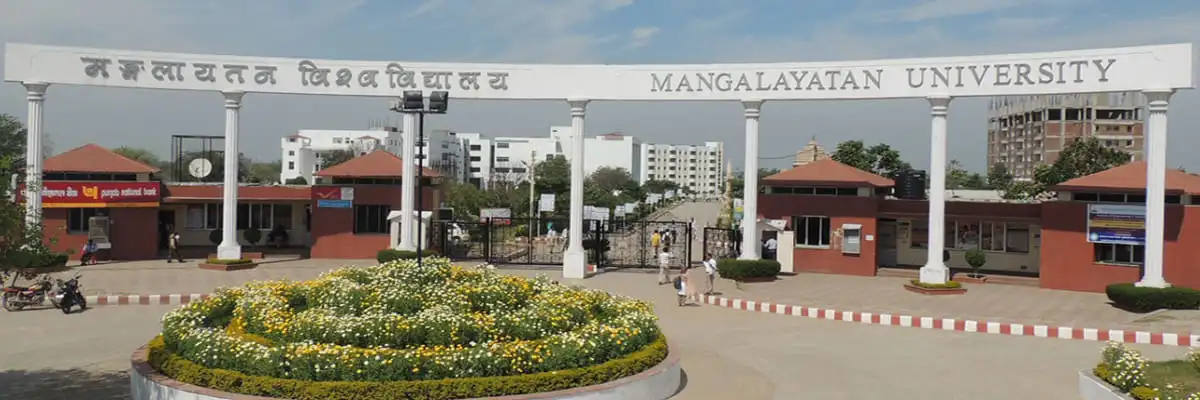
Mangalayatan University is a UGC-recognized private university located in Aligarh, Uttar Pradesh, India. Known for its strong industry connections, cutting-edge curriculum, and commitment to technology-driven education, Mangalayatan University has established itself as one of central India's premier higher education institutions.
The university's vision is to foster academic excellence, industry readiness, and global competitiveness among its graduates — making it an ideal partner for EasyShiksha's mission of accessible, quality online education.
EasyShiksha has signed an MoU with Mangalayatan University to facilitate applications for various university programs and jointly offer B.Voc programs. All degrees and certifications under these programs will be awarded by Mangalayatan University. The EasyShiksha team will provide complete assistance and support throughout the admission and program process.
Mangalayatan University, Uttar Pradesh
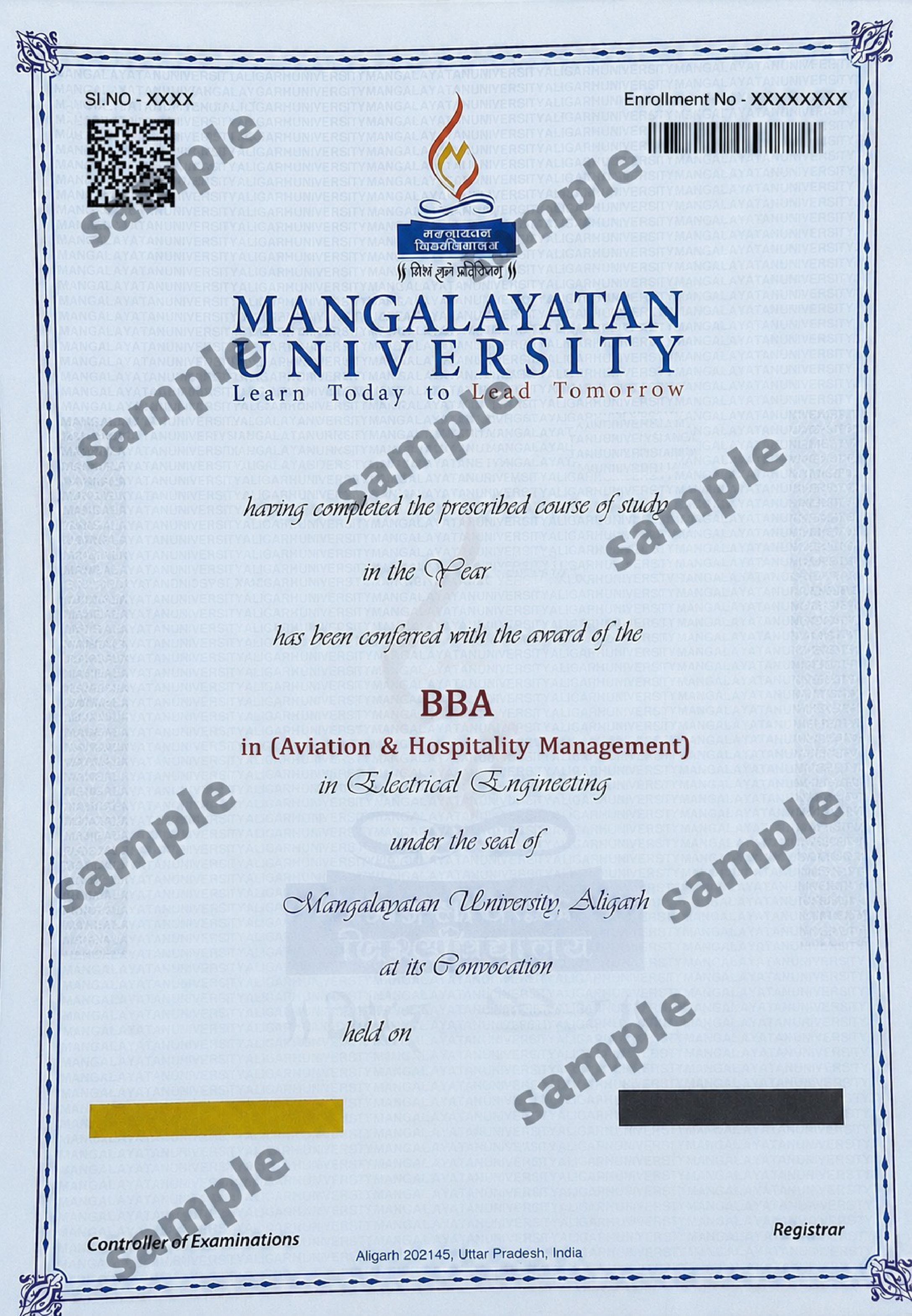
Sample Degree
Documents
Media Gallery
Frequently Asked Questions
Mangalayatan University is located at 33rd Milestone, Aligarh-Mathura Highway, Beswan, Aligarh, Uttar Pradesh, India. The campus is situated in close proximity to the Yamuna Expressway and the cities of Aligarh and Mathura.
Mangalayatan University was established in 2006 under the Mangalayatan University, Uttar Pradesh Act, 2006. The University states that it has the right to confer degrees under Sections 2(f) and 22(1) of the UGC Act.
Yes. Mangalayatan University states that it is recognized by the University Grants Commission (UGC) and was established through an Act of the Uttar Pradesh State Legislature. The University also lists NAAC A+ accreditation among its recognitions.
Yes. The University states that it is recognized by UGC-DEB for Open and Distance Learning (ODL) and is entitled by the UGC to offer online degree programmes. It also states that its online programmes are approved by AICTE.
Mangalayatan University offers programmes across multiple academic levels, including UG, PG, Diploma, PG Diploma and PhD. Its programme portfolio covers areas such as Engineering & Technology, Computer Applications, Management, Agriculture, Biotechnology, Pharmacy, Physiotherapy, Nursing, Journalism & Mass Communication and other disciplines.
Depending on the programme, applicants may be required to provide Class 10 and Class 12 certificates and marksheets, graduation/post-graduation marksheets where applicable, competitive examination rank card where applicable, migration/transfer certificate and recent passport-size photographs. Original documents may be required for verification.
Yes. The University states that students can apply for an education loan through banks, subject to the bank's eligibility criteria.
Mangalayatan University has a 70+ acre campus in Aligarh, Uttar Pradesh.
Mangalayatan University holds an A+ accreditation grade from the National Assessment and Accreditation Council (NAAC).
Yes. Mangalayatan University carries AICTE approval for its technical programmes.
The degree certificate is issued and signed directly by Mangalayatan University, rather than by EasyShiksha or another third-party platform.
The degree certificate is personalised with the student's name, programme, and completion date and carries the university's official signature and seal.
Yes. The university's campus hosts optional immersion sessions associated with select Executive and Hybrid-mode programmes.
Students can select a Mangalayatan University programme, submit their personal details and required documents, pay the application fee, and proceed through the university's application review process.
Yes. Applications submitted through EasyShiksha can be monitored through the dashboard, where applicants can view status updates such as Under Review and Accepted along with their reference ID.
The B.Voc in Visual Effects & Animation is a 3-year undergraduate vocational programme divided into 6 semesters, covering animation, digital art, 3D production, visual effects and post-production.
The programme covers Foundation Art, Script & Screenplay, Classical Animation, 2D Digital Animation, Digital Art, Film Making, 3D Modelling & Texturing, Cinematography, 3D Animation & Rigging, Motion Graphics, Compositing, Visual Effects, 3D Dynamics and Match Moving.
Yes. The programme includes practical labs and production-oriented work in 2D animation, 3D modelling, cinematography, stop motion, lighting and rendering, motion graphics, compositing and VFX. Students also complete major projects, demo-reel work and industrial training.
Students work with digital production and animation workflows involving tools such as Adobe Photoshop, Adobe Premiere, Adobe After Effects and Autodesk Maya, along with 3D modelling, animation, rendering, compositing, tracking and visual-effects techniques.
Graduates can explore careers as 2D/3D Animators, 3D Modelers, Texture Artists, Character Designers, Rigging Artists, Motion Graphics Artists, VFX Artists, Compositors, Rotoscopy Artists, Match Moving Artists, Video Editors, Storyboard Artists and Digital Artists across animation studios, VFX studios, film and television, advertising, gaming and digital media.